The Logs window
File › Logs opens the messages of this run of Virtualbricks: what it says as it opens a project or starts a brick, what the bricks and the events say, and what their programs print. When something goes wrong, look here first: the messages before an error often say why it happened.
An error also opens a window of its own as it happens; the Logs window keeps it, with what came before it.
Reading a message
Each message is a line:
- The time
-
As
10:00:02. A line with the date starts each day, and a time the same as the one above is fainter. Point at the time for the date, and the time to the millisecond. - Where it comes from
-
A brick or an event, in blue, after the picture of its kind; or else the part of Virtualbricks that speaks, in grey, as
Project,SettingsorMain window. A name longer than 14 characters ends with "…". Point at it for the whole name, the kind of the brick, the module of Virtualbricks that logged the message and the process id of the program. - The level
-
A symbol: information, a warning, an error, or a terminal for what a program printed. Point at it for the level in words.
- The message
-
Its first line, orange for a warning, red for an error, bold red for a critical one; then what it folds.
When a brick starts, its message says the command it runs, as Starting: /usr/bin/vde_switch -n 32 -s …: run it in a
terminal to see what the program says. Select the text with the mouse,
and copy it with Ctrl+C.
Folded lines
A message of more than one line shows the first, then ▸ 2 more lines: click it to show the others under it, and again to hide them. An error inside Virtualbricks may have ▸ traceback, 3 calls too, where in the code it happened, which a bug report needs. Expand all and Collapse all, in the menu of the window, open and close them all.
What the programs print
The output of a program shows on a grey band, with 2> before what it writes on its standard error. It
shows as it would in a terminal: a line that the program writes again,
as the monitor of QEMU does with each command, shows as it ends up, and
the colours are dropped. The lines that come together are one message,
the first line in view and the others folded. A line the program doesn't
end, as a prompt, shows with the next one, or when the program
stops.
The filter
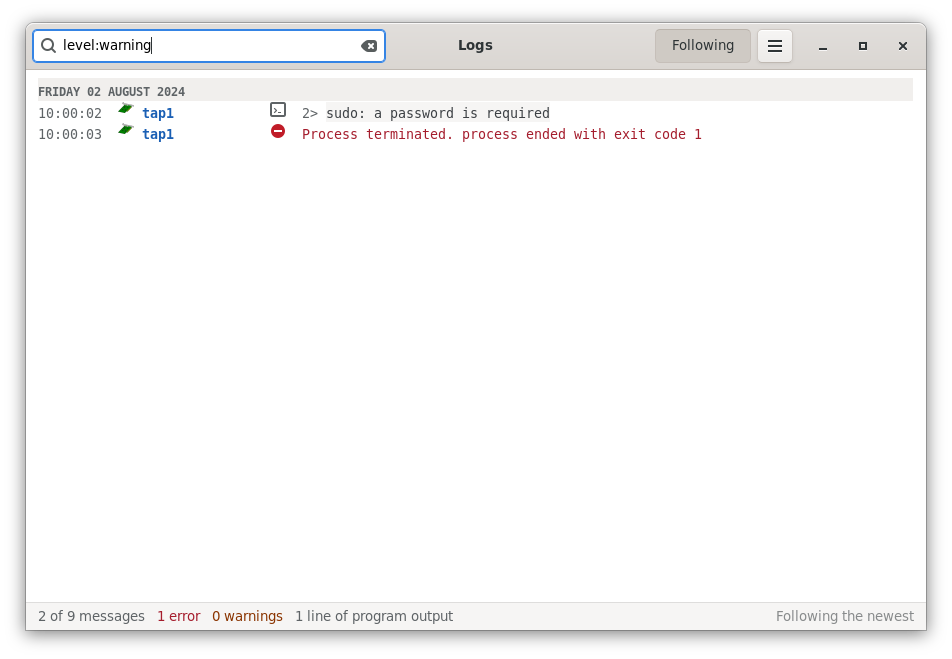
The field at the top keeps the messages that match what you type in it: Ctrl+F goes there, and Esc empties it. A message must match all the words, and upper or lower case doesn't matter:
level:warning-
The warnings and what is worse: the errors, and what the programs wrote on their standard error, which often explains them. Also
level:error,level:criticalandlevel:info, andwarn,errandcritfor short. source:tap1,vm1-
The messages of those bricks or events, or of a part of Virtualbricks, as
source:project. A kind of brick keeps the messages of every brick of the kind:source:qemuthose of the virtual machines; the others areswitch,switchwrapper,router,wire,netemu,tunnellisten,tunnelconnect,tap,captureandevent. - any other word
-
The messages that have it, in any of their lines, folded too, or in where they come from.
The status bar then says how many of the messages show, as 2 of 9 messages.
Following the newest
Following, at the top, keeps the newest message in view as the messages come. Scroll up to read, and it lets go: the status bar says Paused. Scroll back to the end, or click Following, and it follows again. Opening the folded lines of an older message pauses it too.
The status bar counts the messages, then the errors, the warnings and the lines that the programs printed: of all the messages, whatever the filter.
What the window keeps
The messages since Virtualbricks started, the latest 2,000: then each new message pushes out the oldest. They are gone when Virtualbricks quits, so save them first; or start it with virtualbricks --logfile file, which writes them in file as they come.
The information, the warnings and the errors, never the debug messages:
--logfilewrites those too with-v; see virtualbricks(1).File › Logs opens a new window each time, with its own filter and folded lines. Clear, in the menu, empties them all.
The windows of another computer, with
--connect, show the messages of the Virtualbricks there: the latest 500 it had when they connected, then the new ones, each with the computer after where it comes from, assw1 on lab.example. See Another computer.
Saving and reporting
Save…, in the menu, writes all the messages
to a file, whatever the filter, with their folded lines and tracebacks.
Each starts with its date and time, the module that logged it and its
level, as 2024-08-02T10:00:03+0200 [virtualbricks.bricks.Process#error].
Report a bug… opens a new email in your mail program, with the version of Virtualbricks in it and the messages attached: write the address and what went wrong. Where to report a problem is in Reporting a problem.
See also
The messages, a brick that doesn't start, a refused start, a project that can't be read.