Settings
Choose File › Settings, or press Ctrl+P. The window has a page for each place where settings are kept, and a line at the top of each page says where. Each setting has a line that says what it does.
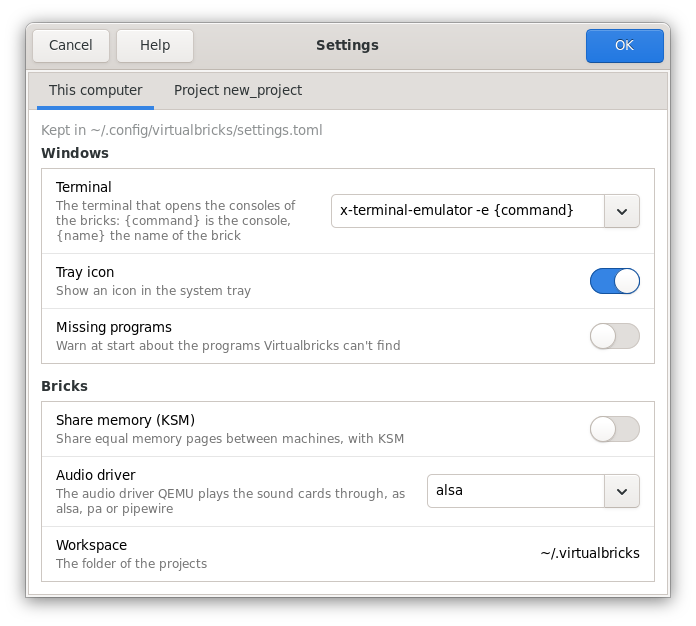
The windows of another Virtualbricks, opened with virtualbricks --connect, have a third page, for the
computer where the bricks run; see Another
computer.
Every setting of the files is in virtualbricks-config(5).
This computer
The settings of this computer, for every project, in ~/.config/virtualbricks/settings.toml:
- Terminal
-
The terminal that opens the consoles of the bricks, as a command line:
{command}is the console, and{name}the name of the brick. The menu offers the terminals of this computer, each in the form it takes, asgnome-terminal -- {command}. Another is typed with its options:xterm -T {name} -hold -e {command}names the window after the brick and keeps it open once the console ends. A terminal without{command}gets-e {command}after it. - Tray icon
-
An icon in the system tray.
- Missing programs
-
A warning at start about the programs Virtualbricks can't find.
- Share memory (KSM)
-
Share equal memory pages between machines, with the KSM of Linux. It turns on or off when you click OK, through
sudo; if it can't, the window stays open on it, and says why. - Audio driver
-
The driver that QEMU plays the sound cards through, as
alsa,paorpipewire. - Workspace
-
The folder of the projects; see Workspaces.
The project
The settings of the open project, in its project.toml, so that it runs the same on another
computer. With no project open, the page is greyed.
- QEMU folder, VDE folder
-
Where the programs are; under each, what the folder holds. See Where Virtualbricks looks.
- Plugs into machines
-
Let plugs go into the socket cards of machines. Machines plugged into each other's cards make a loop, and the bricks on a loop don't start: an error names them, as
vm1 → vm2 → vm1.
OK and Cancel
OK writes only what you changed, so a setting changed meanwhile from the console stays. A setting that is wrong marks its page, and OK stays greyed, with the reason in its tooltip. Cancel changes nothing.
See also
VDE and QEMU: what a missing program stops, and where Virtualbricks looks for them.