Projects
A project is a lab: its bricks, its events, its disk images and its
README. Each is a folder of the workspace, with the file project.toml, the README.md and the private copies of the disks of its
machines. Virtualbricks opens the project that was open last.
The Projects window
Choose Projects › Projects…, or press Ctrl+O. The list has the projects of the workspace, the last used first, each with the first line of its README, its bricks and when it was used last. A project whose images are missing, or whose file can't be read, says so. Typing filters the list by name and description. Beside the list, the selected project shows its README, its bricks, events and images, and the space that it takes.
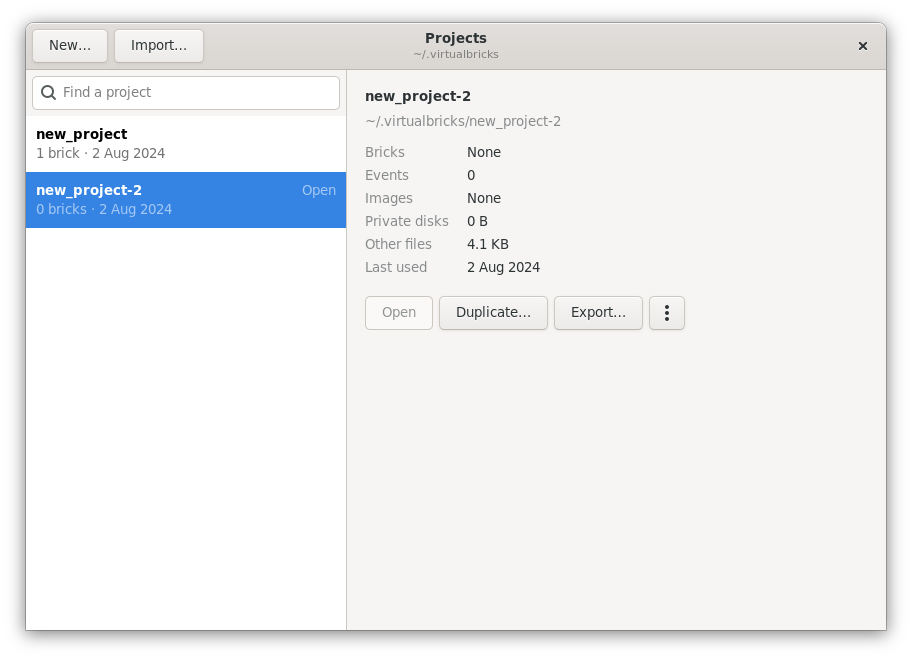
- Open
-
Save the open project, and open the selected one.
- New…
-
A new, empty project, with a copy of the settings of the open one; also Projects › New Project…, Ctrl+N.
- Duplicate…
-
A copy of the project, with the private copies of its disks but not its images, which the copy shares.
- Rename…
-
A new name; the dialog says at once if a name can't be used.
- Show in Files
-
The folder of the project, in the file manager.
- Remove…
-
The folder of the project goes to the trash, where you can restore it, or, where the workspace has no trash, is deleted for good. The dialog says how much it takes. The images it uses stay where they are. The open project can't be removed: open another one first.
- Import…, Export…
-
A project in one file; see Import and export.
Saving
Virtualbricks saves the open project every three minutes, when you open another one and when it quits. Projects › Save, Ctrl+S, saves it now.
Don't edit project.toml while Virtualbricks
runs with the project open: the next save writes over your changes.
Workspaces
A workspace is a folder of projects, ~/.virtualbricks unless the setting workspace names another; the Settings window shows which. It keeps the images that
its projects share, in shared_images. Started
with virtualbricks --workspace folder,
Virtualbricks uses another folder for that run, made if it isn't there,
and a Virtualbricks can run in each workspace side by side.
At start
If the project that was open last can't be opened, the Projects window opens and says why. A project written by a newer Virtualbricks is not read, and never written over.
See also
A lab in one file, for another computer.
Notes on the lab, in Markdown, with pictures.