Since version 2.1, the develop branch of Virtualbricks has gone through a rewrite: more than 240 commits that touch almost every part of the program, from the windows to the command line. It will become Virtualbricks 3.0, and it already carries the version 3.0.0.dev1.
This post is the map: a list of what changed, without the details. Each topic will get a post of its own in the coming weeks. We start with what you see, the windows; then the workspaces; and last, how to drive Virtualbricks from a terminal, a script or another machine.
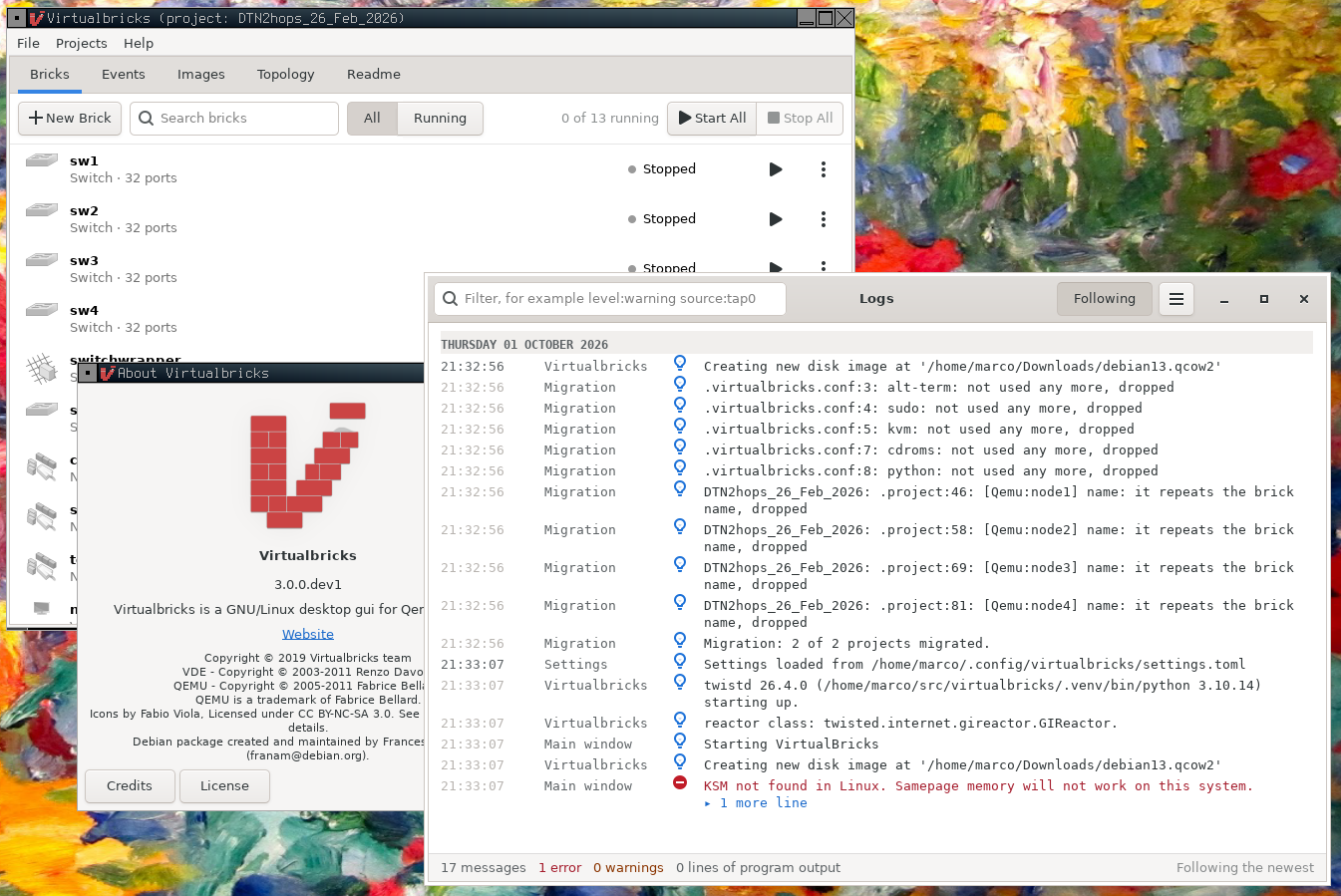
Virtualbricks 3.0.0.dev1: the new Bricks tab, with the Logs window showing the migration of a 2.1 project.
The windows
- Five tabs. The main window has a tab for the Bricks, the Events, the Images, the Topology and the Readme of the project. The menus are reorganized: a Projects menu, File › Settings and File › Logs.
- The Bricks tab. A row for each brick says what it is, whether it runs and what it is plugged into, with Start or Stop and its menu at hand. A search finds a brick. The old Running tab is merged into it, and the settings of a brick open inside the tab instead of taking over the window.
- New Brick. A popover shows the kinds of brick: one click makes the brick, with a name chosen for you, and opens its settings.
- New settings panels. Every kind of brick has a new panel. What you change is a draft until you press OK, and each row uses the words of the project file. The panel of a virtual machine is a sidebar of sections that follows the QEMU the machine will run, and offers what that QEMU has. The channel emulator, Netemu, gets a list of its states and a grid of the chances of moving between them.
- The Events tab. It takes the shape of the Bricks tab: a row for each event says in words what it does and when, with a countdown while it waits, and Run Now in its menu. The actions of an event are chosen instead of typed, and the menu of a brick chooses the event it runs when it starts or when it stops.
- The Images tab. It replaces the image library window: what each disk image is, which machines use it and what a change would touch. Each disk of a machine has an image picker and a mode, and from its menu a disk with a private copy can be saved as a new image, merged into its image, or started over.
- The Topology tab. Virtualbricks now draws the lab itself, with cairo: it zooms from 10% to 400% or fits the whole lab, with Ctrl and the wheel, a pinch or the keyboard, follows the dark theme and greys out the stopped bricks. A brick has a tooltip and the same menu as in the Bricks tab. The picture exports to PNG, SVG or PDF.
- The Projects window. One window to find, create, open, import, duplicate, export, rename and remove your projects, with a summary of each: its bricks, events, images and disks, and when it was used last. A removed project goes to the trash of your desktop, when there is one.
- READMEs in Markdown. The README of a project is Markdown, rendered in the Readme tab, in the Projects window and in the Import dialog.
- Logs. The messages window is now a light console: one line for each message, the brick it comes from, a symbol for its level, and the rest folded until you open it.
- Icons for every kind of brick and for the events.
Workspaces
A workspace is the folder of your projects, ~/.virtualbricks unless you choose another.
- A workspace for each course or client. virtualbricks --workspace FOLDER uses the projects of another folder for a run, without changing your settings, and each workspace reopens the project that was open last in it.
- Side by side. A Virtualbricks can run in each workspace at the same time, each with its own lock, runtime folder and sockets, so two projects with the same name in two workspaces don't get in each other's way.
- How many run at once. --lock chooses the single-instance mode: system, one on the machine, the default; user, one for each user of a shared machine; workspace, one for each workspace, the default with --workspace; or none. When a start is refused, the message names the processes that hold the lock and their users.
- Files in TOML. The settings, the state and the projects are TOML files: settings.toml, state.toml and a project.toml in the folder of each project. Above each key, a comment says what it is for, and the defaults are marked.
- The settings of a project stay in the project, as where QEMU and VDE are; a new project starts with a copy of those of the open one. The bricks that need root run with sudo -A or sudo -n, without a setting.
- Migration. The first time Virtualbricks 3.0 starts, it converts the configuration and the projects of 2.1 once, and shows what it converted. The old files are left as they were.
Remote control
A new console. A command is a noun, a verb and its arguments, for the bricks, the events, the images, the settings and the projects, with help, Tab completion, a history kept between runs and the keys of readline:
brick new switch
brick new vm router
brick set router memory=512 use_kvm=true
brick card add router plug sw1
brick start router
Scripts and labs without a display. The same commands run from a file, with source FILE or --run FILE, from a pipe, and as the actions of an event. --no-gui runs Virtualbricks without its windows, and without GTK, so a lab can run on a server.
The control socket. A Virtualbricks started with --listen listens on the control socket of its workspace, and virtualbricks --command sends it a command from any terminal or script:
virtualbricks --no-gui --listen
virtualbricks --command brick start router
virtualbricks --connect --run start-lab.vb
For programs. The socket speaks Twisted's AMP, with a typed command for each command of the console, or JSON lines with protocol=json, for programs in any language.
Across the network. --listen tcp:PORT listens on a port of this machine, and --listen ssl:PORT:... on the network, with TLS. A client proves that it knows a token without sending it, or shows a certificate.
The windows of another Virtualbricks. virtualbricks --connect DESCRIPTION opens the windows of a Virtualbricks that runs on another machine: the bricks run there, the windows are here, and they follow the project as it changes, whoever changes it. The consoles of the bricks open in a terminal here, and the paths are those of the other machine, completed as you type.
# on the lab machine
virtualbricks --no-gui --no-term --listen \
    'ssl:8765:interface=0.0.0.0:privateKey=lab.pem'
# on your desktop
virtualbricks --connect ssl:lab.example:8765:caCertsDir=FOLDER
Under the hood
- Every window is built in Python and the Glade files are gone, a first step towards the move to GTK 4.
- Virtualbricks needs Python 3.10 or newer, and QEMU 6.2 or newer. Before a machine starts, it asks the installed QEMU what it has, and leaves out, with a warning, a setting that this QEMU lacks.
- It is checked against the QEMU and VDE of Debian 12, 13 and testing, and of Ubuntu 22.04 to 26.04.
- New manual pages: virtualbricks(1), virtualbricks-config(5), virtualbricks-vbp(5), virtualbricks-archive(7) and virtualbricks-control(7).
- End-to-end tests: scenarios written in words and played on the real application.
Try it
The README lists the libraries that the installation needs first. Then:
git clone -b develop https://github.com/virtualsquare/virtualbricks.git
cd virtualbricks
python3 -m venv .venv
. .venv/bin/activate
pip install .
virtualbricks
Help › Contents opens the user guide, and F1 its page about the window you are in, in Yelp or in your browser. The guide is here on the site too.
It is a development version: tell us what breaks on GitHub.